在Vue 2中封装全局轻提示是提高用户体验的一种有效方式。这种全局轻提示可以在整个Vue应用中轻松使用,为用户提供友好的反馈信息。通过封装全局轻提示,可以统一管理提示的样式、动画效果,使得应用在用户交互方面更加一致而专业。
该全局轻提示组件通常包括以下特性:
易用性: 简单的调用方式,可以在任何组件中方便地触发轻提示,无需在每个组件中都编写繁琐的提示代码。
可定制性: 允许开发者自定义轻提示的内容、样式和持续时间,以适应不同的应用场景。
动画效果: 提供平滑的过渡效果,增强用户感知,使得提示的显示和隐藏更加自然。
全局性: 能够覆盖整个应用,确保用户在任何页面都能及时获得相关提示信息。
封装全局轻提示的简介可能包括对其实现方式的简要介绍,如采用Vue的mixin、插件等机制,以及一些示例代码展示如何在应用中使用该全局轻提示组件。这样的封装能够提高代码的可维护性,降低在各个组件中处理提示逻辑的复杂度。
效果
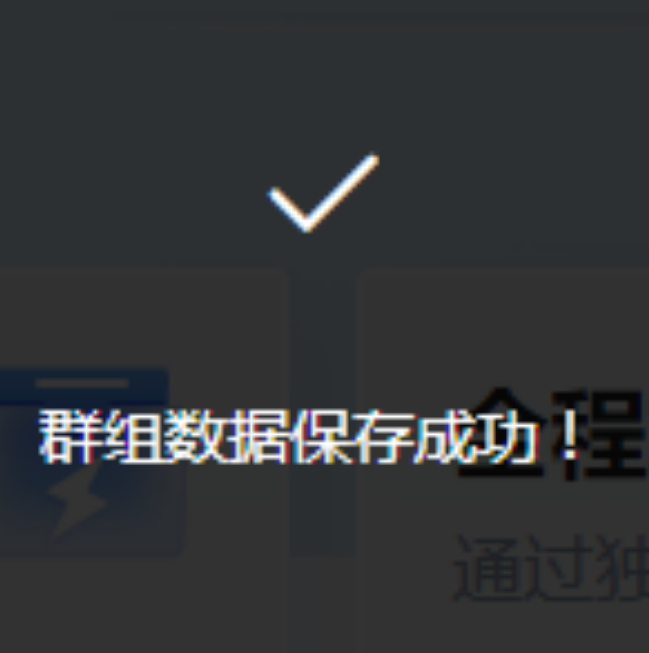
开始封装
创建组件文件
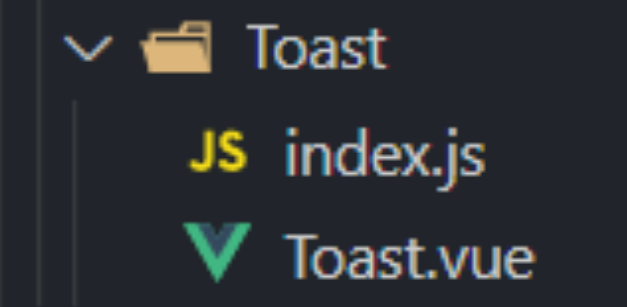
Toast.vue
<template>
  <!-- 一个显示隐藏过渡 -->
  <transition name="fade">
    <div class="toastbox" v-if="show" :style="{ top: top, left: left }">
      <div class="iconbox">
        <i :class="icon"></i>
      </div>
      <div class="textbox">
        {{ text }}
      </div>
    </div>
  </transition>
</template>

<script>
export default {};
</script>

<style lang="scss" scope>
.toastbox {
  width: 11em;
  height: 11em;
  position: absolute;
  margin-left: -5.5em; //水平居中:left:50%,margin-left:'自身元素宽度的一半'
  border-radius: 0.4em;
  background: rgba(0, 0, 0, 0.8);
  color: white;
}.iconbox {
  display: block;
  margin: 1em auto 0.8em;
  text-align: center;
  font-size: 2.2em;
}.textbox {
  text-align: center;
}
.fade-enter-active {
  transition: all 0.5s ease;
}.fade-leave-active {
  transition: all 0.3s ease;
}.fade-enter,
.fade-leave-to {
  opacity: 0;
}</style>
index.js
import vue from 'vue'
import toastComponent from './Toast.vue'

// 组件构造器,构造出一个vue组件实例
const ToastConstructor = vue.extend(toastComponent)

function showToast({ text, duration = 3000, icon = 'el-icon-check', top = '30%', left = '50%' }) {
    const toastDom = new ToastConstructor({
        el: document.createElement('div'),
        data() {
            return {
                show: true,// 是否显示
                text: text,// 文本内容
                icon: icon,// 图标
                top: top,// 离上方的距离
                left: left,// 离左边的距离
            }
        }
    })
    // 添加节点
    const appDom = document.querySelector("#app");
    appDom.appendChild(toastDom.$el)
    // 过渡时间:规定多久后隐藏组件
    setTimeout(() => {
        toastDom.show = false
    }, duration)
}
// 全局注册
function registryToast() {
    vue.prototype.$toast = showToast
}
export default registryToast
man.js
import toastRegistry from './components/Toast/index'
Vue.use(toastRegistry)
使用
this.$toast({
    text: "群组数据保存成功!",
    left: "50%",
    top: "40%",
});
阅读进度 0%

private note
交流
文章暂不开放公开评论。如果你有想法、问题或建议,欢迎私下联系站长。
联系站长